


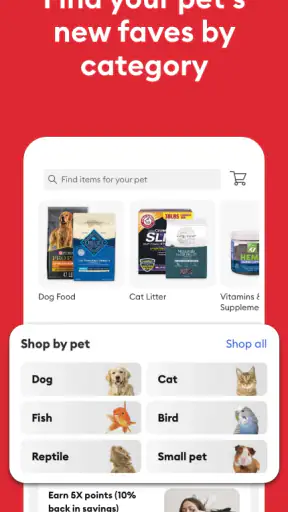




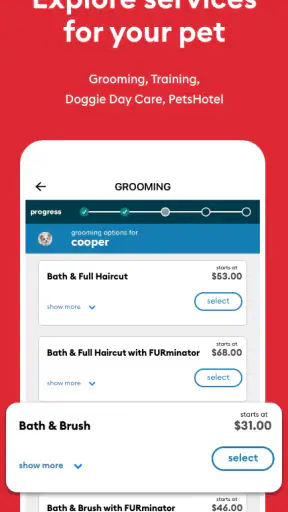


When I think about a shopping app for pet households, the useful test is not whether it can show a catalog. The real question is whether it makes ordinary pet care less scattered when several people share the responsibility. After spending time with PetSmart, I found it most helpful as a practical place to browse supplies, prepare a purchase, and keep a household moving in the same direction without turning every small need into a group discussion.
PetSmart is a free shopping app from PetSmart LLC, aimed at people buying products for their animals. It is listed for Everyone, runs on iOS versions from 9 onward, and has built a sizable audience with over five million installs. Its average rating sits at 3.8 from around twenty-eight thousand ratings, which feels like a fair signal: many people find it useful, but the experience is not so polished that every shopper will enjoy it equally.
I would describe it as a companion to the PetSmart shopping experience rather than a complete pet-management system. It can help me decide what to buy and prepare for a purchase, but it does not replace a shared care routine, a veterinarian’s advice, or a clear agreement about who is responsible for the next bag of food. That distinction matters most when the app is used on a family tablet or by several adults with different shopping habits.
How PetSmart works in a shared household
A realistic weekly shopping situation
Imagine a household with a dog, a cat, and a busy schedule. One person notices that the dog’s food is running low, another is responsible for litter, and a teenager has agreed to pick up treats after school. Without a central shopping habit, everyone may remember a different part of the list. One person buys food, another assumes someone else handled it, and the household discovers the missing item only when it is urgently needed.
This is where I found the app most valuable. I can open it while checking what is needed, compare the available pet products, and use the shopping process as a prompt to think through the whole errand. It is especially convenient when I already know the kind of food, bedding, toy, or care item I want. The app gives that decision a more concrete place than a note buried in a messaging thread.
There is a subtle benefit for shared devices: the app can become a visible starting point for a household conversation. Someone can hand over the phone and say, “This is the food we need,” rather than relying on memory or an incomplete description. That does not create automatic coordination, but it reduces one common source of confusion: people shopping from different assumptions.
My advice is to treat the app as the shopping desk, not the household’s memory. Before placing an order or heading to a store, I would still check the pet’s current food, the quantity already at home, and whether another person has started the same purchase. The app helps with the decision; a quick household check prevents duplicate spending.
Setting boundaries before someone else uses the device
Shared-device use introduces a practical boundary that is easy to overlook. If the app is open on a family phone, the next person may see whatever shopping activity is already on screen. That can be harmless for a bag of litter, but it may be less comfortable if the device is also used by a child or a relative who should not be making purchasing decisions.
I would keep the buying step with the adult who normally handles payment and final approval. A child can help browse toys or compare suitable supplies, while an adult checks the product, the pet’s needs, and the final basket. This is not a special feature of the app; it is simply the safest way to use a shopping tool on a shared device when the app does not replace household rules.
The same boundary applies to accounts. I would avoid treating one person’s logged-in session as a communal account unless everyone understands whose details and purchase history are being used. If several people use the same phone, a quick glance at the account area before shopping is sensible. The goal is to prevent someone from assuming that the visible session belongs to them or that a previous shopper’s choices are still current.
Another useful habit is separating browsing from buying. Letting a family member explore products does not mean they should be the person who completes the transaction. I like this approach because it gives younger household members a role without handing over responsibility they may not be ready to manage. It also helps adults catch unsuitable sizes, flavors, or accessories before the purchase is finalized.
Coordination without pretending the app is a family planner
PetSmart is strongest when the household already has a simple coordination method. I might use the app to investigate a product, then tell the other person exactly what I found and what still needs checking. A shared note, a message, or a spoken agreement can handle the responsibility side. The app handles the shopping side.
This separation is important because shopping information and care information are not the same thing. The app can support a purchase decision, but it should not be treated as proof that a pet has been fed, medicated, groomed, or taken to an appointment. If a family member says they used the app, that only tells me something about shopping activity, not about the animal’s daily care.
I also found that a little preparation makes the app more efficient. Before opening it, I would write down the pet’s brand, product type, size, and any restrictions that matter. For example, “cat food” is too vague if the household needs a specific formula. Having the details ready reduces casual browsing and makes it less likely that two shoppers will choose different products for the same animal.
For recurring purchases, I would use a simple verbal rule: one person owns the next check, and another person can verify it. That is more reliable than assuming that everyone will notice the same low shelf. The app fits neatly into this arrangement because it gives the responsible shopper a place to start, while the second person can confirm the result without taking over the whole process.
What the app is like for different ages
The Everyone content rating makes the app approachable for a broad household, but age suitability and purchasing authority are separate questions. A young pet owner may be perfectly capable of choosing between toys or learning about basic supplies, while still needing an adult to review the product and complete the purchase. I would encourage that kind of supervised participation rather than giving a child unrestricted control of shopping decisions.
For teenagers, the app can be useful as a practical learning tool. They can help identify what is running low, compare options, and prepare a list for the person who buys the supplies. The important lesson is that a product’s appearance is not the same as its suitability. A fun toy may not fit every animal, and a food choice should not be changed casually just because the packaging looks appealing.
For older adults or relatives who are less comfortable with mobile shopping, the app can work well if another household member first explains the basic routine. I would show them how to find the needed category, review the product information, and stop before the final purchase if they are unsure. A large shared screen can make browsing easier, but it can also expose account details, so assistance should be offered with respect for privacy.
Trust matters here. I would not assume that every person using the household device understands which actions are merely exploratory and which actions may commit the household to a purchase. Clear language helps: “We are only looking at options” is different from “This is ready to buy.” That small distinction prevents many accidental misunderstandings with any shopping app, including this one.
Where PetSmart is more useful than ordinary alternatives
The usual alternative is a general marketplace app. Those services can be excellent when I want the widest possible selection or when I already know the exact product and simply want to reorder it. They may also be more familiar to other members of the household. However, a pet-focused retailer gives the shopping trip a clearer purpose. I am not searching through an enormous range of unrelated goods before reaching food, care items, or accessories.
A local store visit has a different advantage: I can ask an employee a question in person and inspect an item before buying it. That may be better when I need immediate help, want to judge a toy’s physical size, or feel uncertain about a product. The app is more useful when I want to browse from home, prepare before leaving, or avoid making the entire household trip revolve around one missing supply.
I would also distinguish it from a notes app. A note is better for assigning responsibility, recording feeding information, or keeping a running household checklist. PetSmart is better for turning a shopping need into a product search. Trying to make it perform both jobs would create unnecessary friction, so I prefer using each tool for what it actually does well.
Three practical habits that improve the experience
First, I would begin with the animal’s need rather than the product’s appearance. Make a short list of the pet, the purpose, and the acceptable alternatives before browsing. This limits impulse choices and makes it easier for another household member to understand what is being considered.
Second, I would use a handoff routine on shared devices. The person who browses should tell the next person whether the basket is only a shortlist or is ready for review. This simple label prevents a teenager, guest, or partner from mistaking an unfinished selection for an approved purchase.
Third, I would check the physical supply at home before opening the shopping screen. Pet products often look interchangeable until I compare the exact type, size, or flavor already in the cupboard. A thirty-second inventory can be more valuable than several minutes of browsing, especially when two people shop for the same pet.
A fourth habit is worth adding for households with multiple animals: keep the pet names and needs mentally separate, even if the app shows products in the same general shopping environment. A food choice suitable for one animal may not be suitable for another. The app can help find products, but it cannot make a household’s care decisions for it.
Limitations I noticed in the overall fit
The 3.8 average tells me not to expect a flawless experience, and my own judgment is similar. A shopping app can feel very convenient when I know what I want, yet less satisfying when I am trying to solve a complicated pet-care question. Browsing products is not the same as receiving individualized guidance, and I would not use the app as a substitute for professional advice about health, allergies, or a sudden change in behavior.
It can also be less suitable for people who dislike mobile shopping altogether. If I need to ask several questions, compare an item physically, or make a quick purchase while already near a store, the ordinary alternative may be faster. The app adds the most value before the shopping trip, not necessarily during every urgent situation.
Shared use can introduce its own friction. A single device may blur who was browsing, what was selected, and whether someone else has already acted. That is a household coordination problem rather than a reason to reject the app, but it means I would not recommend leaving responsibility implicit. One named shopper and one clear confirmation step make the experience much safer.
The app is also not the right choice for someone looking for a dedicated pet diary, medication tracker, or family task manager. Its role is shopping. I appreciate it more when I keep that role narrow instead of expecting it to organize every part of life with an animal.
Version, cost, and who should use it
The current version is 15.9.0, and the app remains free to install. That makes it easy to try without committing money to the software itself. The practical cost is the time spent learning where things are and deciding whether the mobile route is genuinely more convenient than visiting a store or using a general marketplace.
I think it suits pet parents who already buy from PetSmart, households that want to prepare shopping before an errand, and people who appreciate keeping product discovery in a pet-specific environment. It is especially useful when one person does the browsing and another provides final approval, because that workflow gives the app a clear place in the household.
I would skip it if I only need a highly specialized care-management tool, if I strongly prefer face-to-face shopping, or if my household cannot agree on who is allowed to make purchases from a shared device. In those situations, the app may add another screen without solving the underlying problem.
My household verdict
After using PetSmart as a shopping companion, I see its value in the small decisions around pet ownership: checking what is needed, preparing a purchase, and giving another person a clearer starting point than a vague message. It does not magically coordinate a family, and I would not pretend that a product catalog can replace communication. Used with simple boundaries, though, it can make shared pet shopping calmer and more deliberate.
My favorite setup is straightforward. One person checks the supplies, another confirms the list, and the adult responsible for the account reviews the final purchase. Younger users can participate in browsing, while older relatives can receive help with the unfamiliar steps. Everyone knows where shopping begins and where household responsibility still belongs.
My final recommendation is positive, with realistic expectations: try it if you want a free, pet-focused way to prepare purchases and reduce scattered shopping conversations. Keep a separate household note for care duties, verify the exact product before buying, and do not confuse app activity with proof that a pet-related task has been completed. For that focused role, PetSmart is a useful addition to a household routine, even if it is not a complete solution for managing life with pets.


